Demand
To append /dev/sda3 to /home , you need to mount the /dev/sda3 to a subdirectory under the /home directory or merge the /dev/sda3 into an existing /home partition. Here are the detailed steps for both methods:
Method 1: Mount /dev/sda3 to a /home subdirectory
Create a Mount Point directory
First, create a new directory under the /home directory as Mount Point. For example, create a directory named docker :
sudo mkdir /home/docker2. Mount /dev/sda3
Use the mount command to mount /dev/sda3 to the newly created directory:
sudo mount /dev/sda3 /home/docker3. Edit /etc/fstab files
To ensure that the system automatically mounts the /dev/sda3 after a reboot, you need to edit the /etc/fstab file.
Open the /etc/fstab file with your favorite text editor, such as nano or vim :
sudo nano /etc/fstabAdd the following line at the end of the file:
/dev/sda3 /home/docker ext4 defaults 0 0Save and close the file.
4. Confirm successful mounting
Use the df -h command to confirm that /dev/sda3 has been successfully mounted to the /home/docker :
df -hThe output should contain /dev/sda3 Mount Point.
Method 2: Merge /dev/sda3 into an existing /home partition
- Confirm if
/dev/sda3have been merged
First, confirm that the /dev/sda3 have been merged into the /dev/mapper/centos-home . You can use the pvs and vgs commands to view information about physical volumes and volume groups.
sudo pvs
sudo vgs
From the output of pvs and vgs , /dev/sda2 is the only physical volume (PV), and it has been fully allocated to the volume group (VG) centos . This means that /dev/sda3 is not included in the centos volume group.
Since /dev/sda3 is not included in the centos volume group, you need to add it to the volume group and then expand /home logical volume.
- Add
/dev/sda3tocentosvolume group
First, use the pvcreate command to initialize the /dev/sda3 to a physical volume:
sudo pvcreate /dev/sda3
Then, use the vgextend command to add /dev/sda3 to the centos volume group:
sudo vgextend centos /dev/sda3
- Extended
/homeLogical Volume
Now you can use the lvextend command to add /dev/sda3 space to /home logical volume:
sudo lvextend -l +100%FREE /dev/mapper/centos-home
- Extended file system
Use the resize2fs command to extend the file system:
sudo resize2fs /dev/mapper/centos-home
From the error message, the resize2fs command cannot find a valid filesystem superblock for the /dev/mapper/centos-home . This usually means that there is no correct filesystem on the /dev/mapper/centos-home , or that the filesystem is corrupted.
- Confirm file system type
Use the blkid command to check /dev/mapper/centos-home filesystem type:
sudo blkid /dev/mapper/centos-home
As you can see from blkid ‘s output, the filesystem type on the /dev/mapper/centos-home is xfs , not ext4 . Therefore, you need to use the xfs_growfs command to extend the xfs filesystem, not resize2fs .
- Extend the
xfsfile system usingxfs_growfscommands
sudo xfs_growfs /dev/mapper/centos-home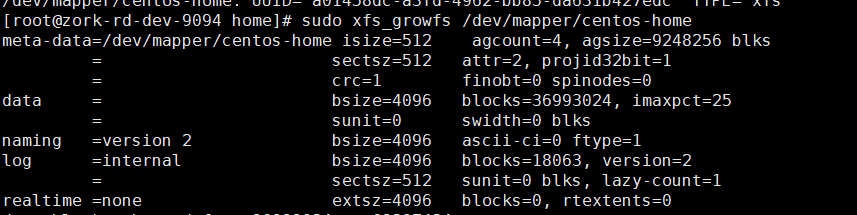
- Confirm expansion successful
Use the df -h command to confirm that the size of the /home partition has increased:
df -h